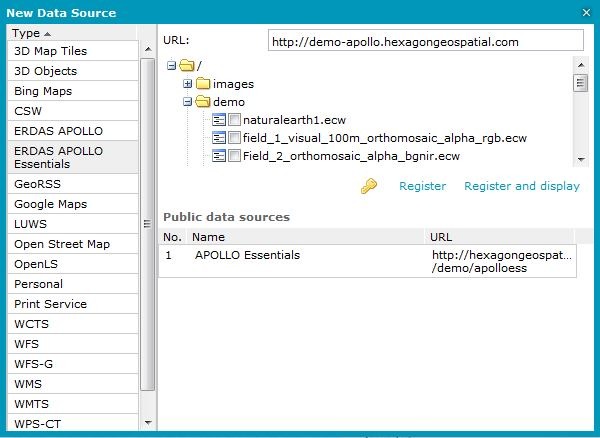
To register and consume satellite imagery data from the ERDAS APOLLO Essentials:
Open the New Data Source dialog box, and then select the ERDAS APOLLO Essentials connector from the connectors Type list.
Type the appropriate URL to the ERDAS APOLLO Essentials service in the URL field (for example, http://iws.erdas.com/).
Using the tree in the dialog box, select the data to display.
Click Register and display. The service will be registered, and selected images will be displayed automatically. You can click Register and later select and display images using the Display features classes and queries or Display maps commands available on the Data Sources tab.
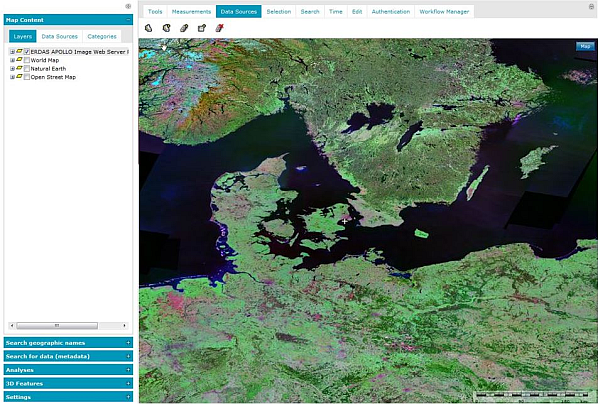
Satellite imagery in ECW format is displayed in the map and is ready to view, without placing a heavy load on computer memory and processors, while also maintaining high compression ratios and visually lossless image quality.
The enhanced compression wavelet (ECW) is a high-performance compressed file format designed specifically for geospatial imagery. To be able to consume ERDAS APOLLO Essentials satellite imagery data (in ECW and JP2 format) in Geospatial Portal, the ERDAS ECW plug-in must be installed.
This plug-in adds high-performance streaming of both ECW and JP2 geospatial aerial and satellite imagery over the internet using the ERDAS Compressed Wavelet Protocol (ECWP) or the JPEG2000 Interactive Protocol (JPIP) from the ERDAS APOLLO Essentials.
When trying to connect the ERDAS APOLLO Essentials service without having the plug-in installed, an appropriate message will be displayed in the notification area. To download the ECW Plug-in, use the link provided on the Geospatial Portal Welcome Page or contact with the Geospatial Portal administrator.
The Microsoft Internet Explorer and Mozilla Firefox browsers are supported.
 This section is valid for all product flavors.