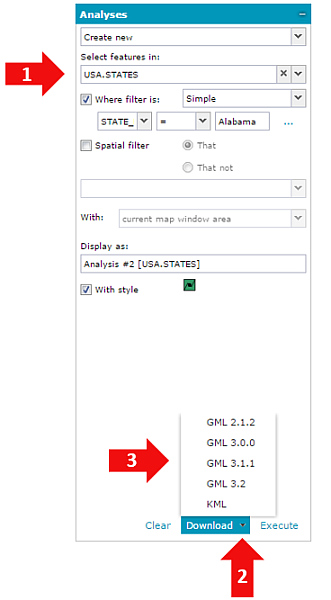
The result of a performed analysis can be downloaded to vector files such as KML, Shapefile, and GML. The availability of particular formats depends on the Geospatial Portal configuration and the capabilities of the service that serves data for analysis.
To download analyses to a vector file:
Set analysis parameters. For more information see Analyses.
Click the down arrow on the Download button to view all available vector formats.
Click on selected format to download analysis result to a file.
The Download button is available only when an analysis is performed on vector data served by Web Feature Service (WFS).
The Download button is active only if all required fields on the Analyses tab are filled in. If Download is clicked without unfolding the list with available formats, the data will be downloaded in default format. For more information about setting the default vector format, contact the Geospatial Portal administrator. There is no need to click Execute before downloading the result to a vector file. The number of WFS features downloaded to a file can be limited according to the Geospatial Portal configuration. For more information about setting the download limitation for WFS features, contact your Geospatial Portal administrator.
With the default Geospatial Portal configuration, the analysis result can be downloaded only to vector formats (e.g. GML, KML, CSV, Shapefile) that are supported by connected service (WFS). Information which vector formats are supported by the service used for analysis can be obtained by performing GetCapabilities request. For more information about enabling/disabling vector formats to download in Geospatial Portal, contact the Geospatial Portal administrator.