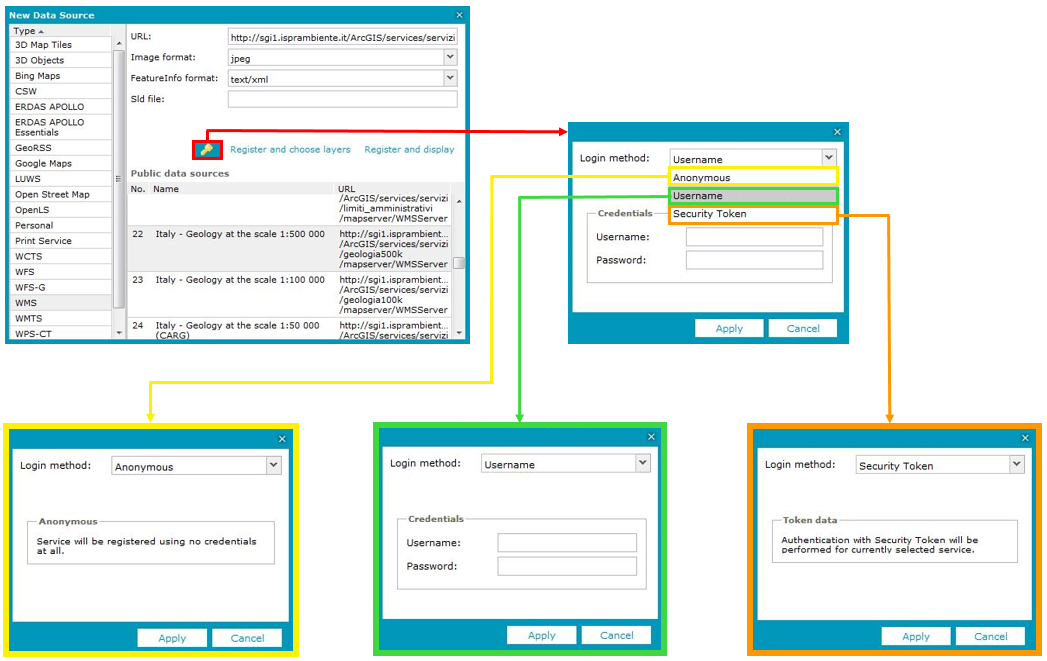
To establish user authorization when registering a service:
Click the Data Sources tab on the toolbar.
Click Define a data source. The New Data Source window opens. Provide the URL to the service you want register and set all other available options.
Click .
Select the login method and provide credentials (if required).
Click Apply.
Once authorization is complete, you can use the data provided by the services, but there is no notification to confirm the proper authorization. If authorization is not successful, the service registers successfully, but data is not accessible.
There are three ways of authorization, based on the Method drop-down list:
Anonymous – No authorization is required.
Username – Provide a valid username and password.
Security Token – Use a Security Token sent from the STS Web Service to the requested service provider.
The appearance of the authorization form depends on the login method, as shown in the picture below:
 . The New Data Source window opens. Provide the URL to the service you want register and set all other available options.
  .
.