This feature is valid for the following product flavors: Geospatial Portal; GeoMedia WebMap Essentials. For Geospatial Portal this feature is accessible only if portal is run in GWMPub.aspx layout.
 This feature is valid for the following product flavors: Geospatial Portal; GeoMedia WebMap Essentials. For Geospatial Portal this feature is accessible only if portal is run in GWMPub.aspx layout.
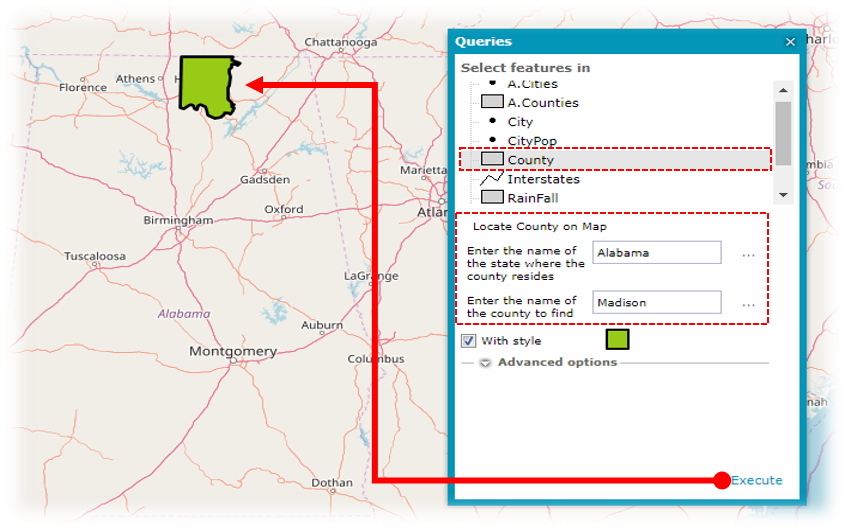
The Query command  (available on the toolbar) lets you perform a series of attribute-based, predefined queries on data from the selected sources.
To perform predefined query:
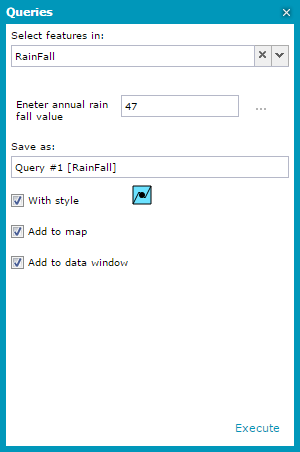
There are different predefined queries for a single feature class, thus the description and parameter field may vary depending on the selected data sources and classes.
It may happen that a non-parameterized query is defined for a given feature class. In such a case, you cannot change the query parameter value for that query.
The predefined queries are supported only with registered GeoMedia WebMap Publisher service.
Simplified Query Panel
Optional simplified query widow provides a flat query selection (without having to pick the source) and eliminates the drop-down menu. Also, the quotation marks are removed from the parameters field.
Administrator of Geospatial Portal can configure simplified user query interface for simple installations or extensive query interface for sophisticated solutions.For more information contact with your administrator or see Geospatial Portal Administrator Guide.