 This section is valid for the following product flavors: Geospatial Portal, GeoMedia WebMap Advantage, GeoMedia WebMap Professional, ERDAS Apollo Advantage, ERDAS Apollo Professional, ERDAS Apollo Essentials.
 This section is valid for the following product flavors: Geospatial Portal, GeoMedia WebMap Advantage, GeoMedia WebMap Professional, ERDAS Apollo Advantage, ERDAS Apollo Professional, ERDAS Apollo Essentials.
Scale bands specify a map scale in which every single layer is visible on the map.
Setting a scale band for map layers:
 .
.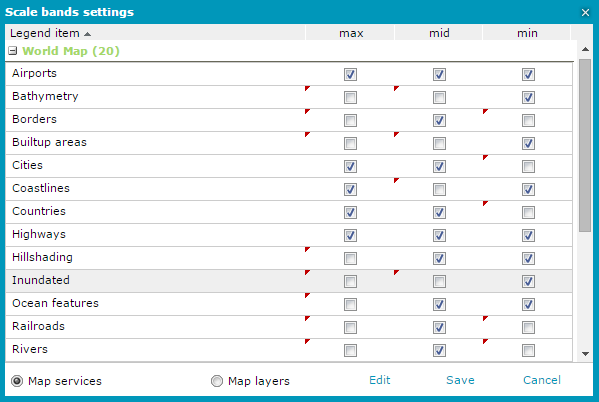
Scale bands functionality allows to prevent displaying certain layers on certain zoom levels, even if the service would return an appropriate image for this layer, this particular layer will be excluded from the GetMap request.
Scale hints in Web services like WMS/WMTS inform when layers may not return appropriate images. This is used in the portal to display legend items representing those layers in grey (also prevent its presence in the GetMap request). According to the OGC WMS 1.3.0 specification the scale denominator values are guidelines for clients, not firm limits. Upon receiving a request for a map that is not within the scale denominator range, the server may return a blank map, or may return a portrayal of the Layer that is crowded with features or otherwise poorly suited for display”
Portal scale bands and service scale hints are independent from each other. Scale bands may be used to filter out more than the scale hints do.