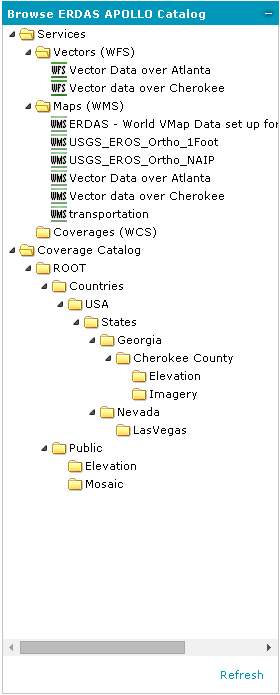
On the Browse ERDAS APOLLO Catalog panel, you can browse for all of the data that you are able to access through the Web Client.
In the Browse ERDAS APOLLO Catalog tree, the following elements may be listed depending on conditions that exist in the catalog:
The Services node shows all of the service providers that you can access through the Web client. These service providers are categorized by the type of protocol used.
All of the datasets and aggregates in the catalog are shown as nodes under the ROOT aggregate for the catalog. You can open an aggregate node to see the child aggregates, if there are any. If you click on an aggregate, the Results Panel will display more information about the aggregate and a list of the datasets that it contains.
Detailed information about selected items from the catalog are displayed in the bottom Search Result panel, where you can perform some actions such as adding to the map, viewing metadata, displaying the spatial extent of data on the map, and more (see Working with Search Result Panel).
 Only one catalog service can be connected to the Geospatial Portal at once. In order to browse data from another catalog service, you need to remove the actual catalog from registered data sources and then connect a new one.
To refresh the directory tree and to see the changes made in the ERDAS APOLLO Catalog, click Refresh in the lower-right corner of the tab.
 Browse ERDAS APOLLO Catalog is available only with apollopro.aspx or apollo.aspx layout.